
The zero trust platform that proves every connection.
Platform, security and IT teams use MeshTransit to connect people, servers and entire sites over WireGuard®, see exactly who can reach what and why, and share with partners without merging networks. Open source, in the cloud or on your own servers.
- Built on WireGuard®
- Linux, macOS, Windows, Android
- Highly available on Kubernetes
Built for teams that answer for access.
When a customer, an auditor or a board asks who can reach your systems, MeshTransit is the answer you can show them.
Managed service providers
Every customer is another VPN, another firewall, another spreadsheet of who has access.
Run every customer from one Console, each in its own Workspace, and hand each one a report of exactly who can reach their systems.
- One Workspace per customer
- Overlapping customer ranges
- Per-customer audit export
Regulated and audited teams
Access reviews take weeks of screenshots, and nobody can say who could reach production last March.
Answer the auditor from the record: who could reach each system on any date, why, and who approved it.
- Sealed, exportable audit trail
- Four-eyes approval
- History at any past moment
Companies working with vendors and partners
A vendor needs one database, and the VPN gives them the whole network.
Give each partner one service on one port, until a date both sides agreed, and revoke it everywhere in one click.
- Trust Contracts with expiry
- No network merging
- Partners see only what they reach
Mergers and acquisitions
Two companies, the same 10.0.0.0/8, and a renumbering project nobody wants to fund.
Connect the two sides on day one through alias addresses, and move systems over on your own schedule.
- Overlapping IP ranges
- Separate Workspaces, one owner
- No renumbering
Every path. Every reason.
No more reading rule files to guess. Pick any two devices and MeshTransit names the rule, the group and the approver behind the answer. The Access Graph lists everything that can connect, across rules, Sites, exit pools and shares.
Try it: Policy Explain
Allowedmaya-laptop → db-prod · tcp/5432
- user groupEngineering, from Maya’s sign-in
- ruleEngineering → tag postgres · tcp/5432
- approvedby Alex on 3 Oct, release 42
Removing the rule cuts access for 3 devices
Access Graph · Network Production
31 people, 6 databases. Approved by Alex on 3 Oct, in force since release 42.
4 servers, 6 databases. A device group: a new billing server is covered when it joins.
One address on the office network, routed by office-gw-1 with office-gw-2 on standby.
Acme’s runner reaches one cache over a Trust Contract that Acme accepted. Neither side renumbered.
Time-boxed access for 3 contractors. It closes on 2 Nov without anyone remembering to.
Internet traffic leaves through exit-sg-1. The office LAN stays blocked at the exit.
Membership follows the on-call user group, so the rule never changes hands.
2 collectors read metrics from 64 servers. Nothing reaches back the other way.
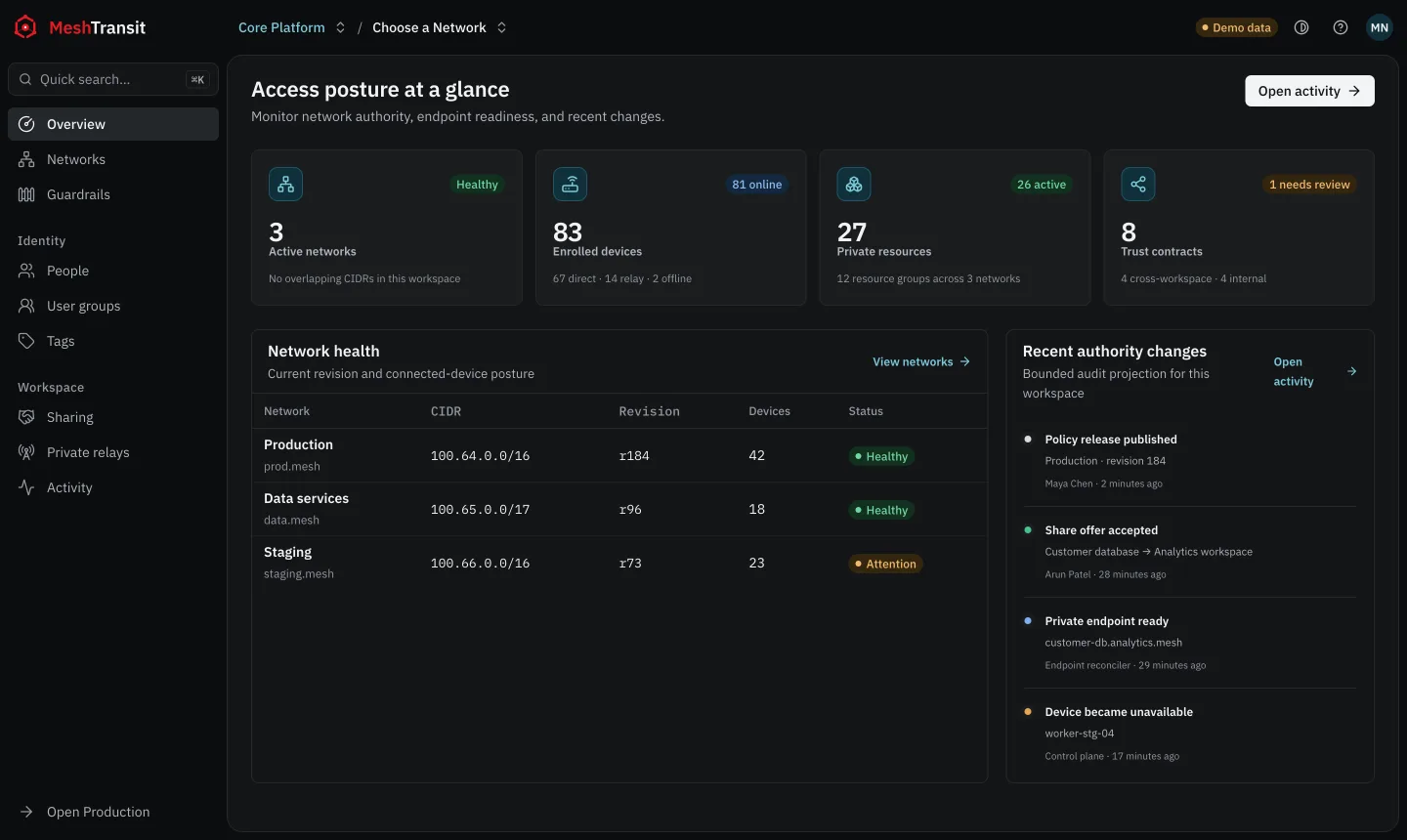
One Workspace. Every network.
Production, staging, every customer, every office: each gets its own Network with its own devices, rules and addresses, all run from one Console with one set of people and groups.
Many Networks in one Workspace
A Workspace holds your people, groups and tags. Each Network inside it has its own devices, rules and address range: production, staging, a customer, an office.
MSPs and platform teams run every environment from one Console without pooling them into one flat network.
Northwind PlatformWorkspace · 4 Networks
- Production100.64.0.0/16412 devices
- Staging100.65.0.0/1658 devices
- Customer · Acme100.66.0.0/1623 devices
- Office100.67.0.0/1640 devices
Highly available on Kubernetes
Core runs with several replicas of each role on Kubernetes and keeps devices connected through restarts and upgrades. A single server works too.
Core on KubernetesHealthy
- apiRunning3 / 3 ready
- controlRunning4 / 4 ready
- workerRunning2 / 2 ready
- relayRunning2 / 2 ready
Sites for networks you cannot install on
A Site routes a subnet, such as an office LAN or a cloud VPC, through routers you choose, with a standby ready. Rules can target a whole Site or one address inside it.
Site · Office LAN10.40.0.0/24
- office-gw-1Primary31 clients
- office-gw-2Standbyready
Exit pools for Internet traffic
Send a laptop’s Internet traffic out through exit nodes you run, picked by health and round-trip time.
The local network stays blocked at the exit, a kill switch holds traffic if the tunnel drops, and the Console shows who uses which exit.
Exit pool · SingaporeLAN blocked · SMTP blocked
- exit-sg-1Healthy23 devices
- exit-sg-2Healthy9 devices
Direct paths, with your own relays as backup
Devices connect peer to peer over WireGuard® and punch through NAT where they can. When they cannot, traffic falls back to an Interchange relay.
Run a Private Interchange relay in your own network and choose which Networks may use it.
maya-laptop · peersWireGuard
- db-prodDirect3 ms
- grafanaDirect2 ms
- build-cachePrivate relay8 ms
- office-nasRelay · sgp141 ms
Rules written about people and roles
Rules name user groups, device groups and tags, never IP addresses. Membership changes apply live, without publishing the policy again.
Guardrails set what no rule may ever allow, such as partners reaching production, and refuse a change that breaks them.
GuardrailWorkspace-wide
Partners never reach tag postgres
RefusedRule “Acme → tag postgres” breaks this guardrail
user group · Engineering 31device group · Billing services 4tag · postgres 6
Change access without surprises.
See the blast radius before you click publish. Every change is reviewed, previewed and approved before it touches a single device.
Write the rule in plain terms.
Pick who, what and which port from your groups, tags and Sites, and say why. The reason stays on the record.
Then see what it opens and closes.
Before anything is published, the impact preview lists every pair of devices that gains or loses access, and checks each Guardrail.
Publish, and watch it land.
A second admin approves. The release reaches every device, and each one reports the release it enforces.
New rule
- From
- User group · On-call
- To
- Site · Office LAN · 10.40.0.0/24
- Service
- tcp/22
- Reason
- On-call access to the office switches

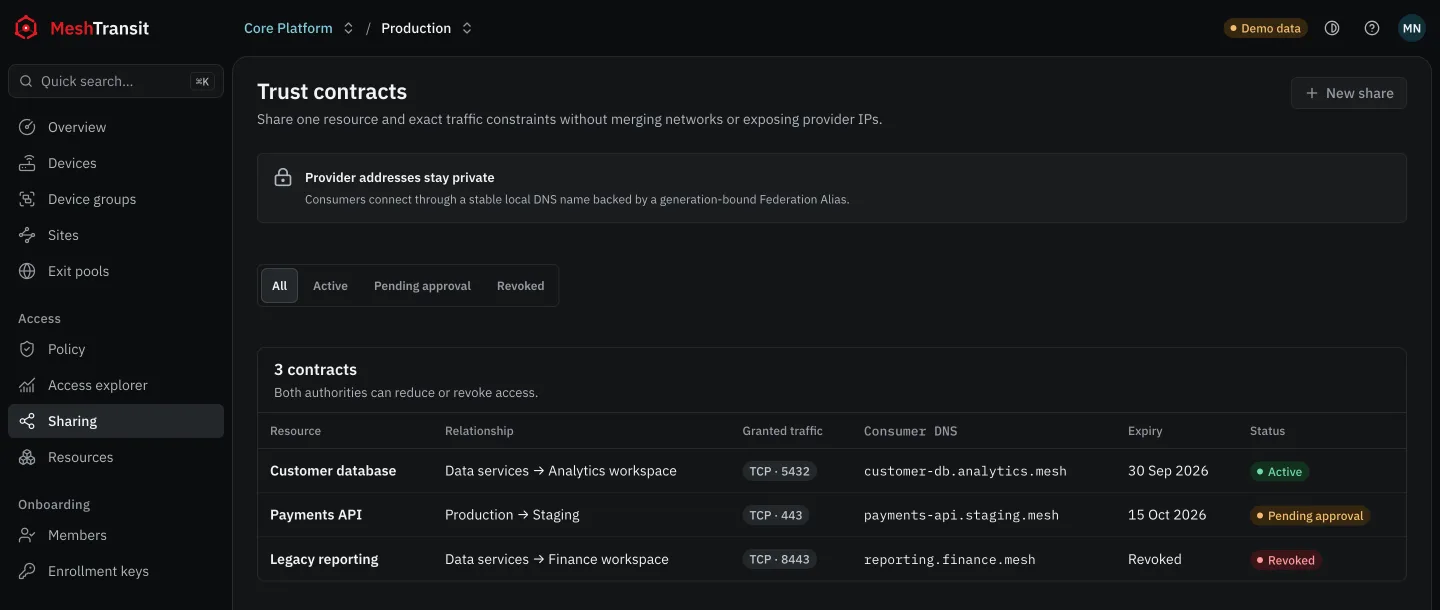
Share, don’t merge.
Give a partner, a vendor or a customer one door to one service, never your whole network. Overlapping IP ranges just work, and nobody renumbers.
Audit-ready from day one.
Hand your auditor proof, not screenshots: a sealed history of every change, who could reach what at any past moment, and which release each device enforces right now.
Every change, chained to the one before it
- 09:14Release 43 publishedEngineering → Site Office LAN · tcp/22, approved by AlexMaya
- 09:02Change approvedThe author cannot approve their own changeAlex
- 08:47Trust Contract renewedAcme · build-cache · tcp/443 until 30 NovSam
- 08:30Device removedold-laptop-07, key revoked on every peerAlex
Who could reach db-prod on 14 Sep at 22:00?
- 22:007 devices could connectthrough 2 rules in release 38Answer
- 21:40contractor-02 lost accessContractors rule expired on scheduleExpiry
- 18:05billing-api-4 gained accessjoined Billing services, no rule changedGroup
- 09:30Release 38 took effectpublished by Maya, approved by SamRelease
Which devices run release 43 right now
- 09:15409 of 412 devices appliedwithin 40 seconds of publishingApplied
- 09:152 devices offlinethey receive release 43 when they reconnectPending
- 09:161 device refused the mapqa-runner-3 failed closed and blocks all trafficFailed
Each device reports what it enforces
- 09:15db-prod enforces release 43its packet filter digest matches the published oneMatch
- 09:15office-gw-1 enforces release 43route filter for Site Office LAN matchesMatch
- 09:16qa-runner-3 differsits filter is empty: it refused the map and blocks everythingMismatch
Enterprise-ready from the first rule.
The controls your security questionnaire asks about are part of the product, not an upgrade you negotiate later.
Single sign-on
People sign in through your OpenID Connect identity provider. No shared VPN passwords to rotate.
Roles and separation of duties
Built-in owner, admin, Network admin and IT admin roles. The author of a change can never approve it.
Guardrails
Company-wide rules no Network admin can override, such as partners never reaching production.
Least privilege by default
Nothing connects until a rule allows it. Access can be time-boxed and closes on its own.
Tamper-evident audit
Every change is hash-chained to the one before it, exportable, and verifiable offline.
Offboarding in one step
Remove a device and every peer drops its key at once. Departing people lose access with their account.
End-to-end encryption
WireGuard® between your devices. Relays forward packets they cannot read.
Your servers or ours
Self-host with every feature, on one server or highly available on Kubernetes, or use MeshTransit Cloud.
Evidence your auditor already asks for
MeshTransit records the access evidence these controls are tested on. It supports your certification; it is not one.
- SOC 2
- CC6.1 Logical accessCC6.2 Granting accessCC6.3 Removing accessCC8.1 Change management
- ISO/IEC 27001:2022
- A.5.15 Access controlA.5.18 Access rightsA.8.15 LoggingA.8.32 Change management
- PCI DSS v4.0
- Req. 7 Need to knowReq. 10 Log and monitor
Rolling out across the company?
Talk to the people who build MeshTransit about a commercial license, a guided rollout on your own servers, and support terms that fit your team.
- Commercial license for Core and relay
- Self-hosted or MeshTransit Cloud
- Migration plan from your current VPN
Open source. Nothing to hide.
Read every line that decides who can reach what. Run MeshTransit on one server or across a Kubernetes cluster with the same features as MeshTransit Cloud, and no account with us.
- Core and relay
- AGPL-3.0
- Clients and protocol
- Apache-2.0
- Runs as
- Cloud or self-hosted
$ git clone https://github.com/meshtransit/meshtransit
$ cd meshtransit
$ make build container-build
bin/meshcore bin/meshrelay bin/meshd bin/meshctl
Components
- Core, the control planeAGPL
- Interchange relayAGPL
- meshd client daemonApache
- meshctl command lineApache
- MTCP and MTRP protocolsApache
- Linux packages and unitsApache
Clients
- Linux, amd64 and arm64Download
- macOSBeta
- WindowsBeta
- AndroidBeta
- Site routers on LinuxDownload
- Exit nodes on LinuxDownload
Questions, answered.
MeshTransit is an open source zero trust network access platform built on WireGuard. It connects people, servers and whole subnets, and it can tell you who can reach what, why, since when, and prove it with a sealed audit trail.
Yes. Core and the Interchange relay are AGPL-3.0, and the clients, protocol libraries and API contracts are Apache-2.0. The source is on GitHub, and you can run all of it on your own servers.
A mesh VPN connects devices. MeshTransit also explains every connection, previews what a change will open before it is published, shows which devices enforce each release, and shares single resources between organisations without merging their networks.
Yes. Core runs as one process on a single server, or as separate API, control and worker roles that scale out on Kubernetes. Self-hosted Core has the same features as MeshTransit Cloud.
Yes. Core runs with several replicas on Kubernetes, and Sites, exit pools and relays have standbys, so one failure does not take access down.
Yes. Shared resources are reached through alias addresses that both sides see in their own space, so a partner on 10.20.0.0/24 can reach your service on 10.20.0.0/24 and nobody renumbers.
Linux packages for amd64 and arm64 can be downloaded today. macOS, Windows and Android clients are in beta. Site routers and exit nodes run on Linux.
No. Traffic is end-to-end encrypted with WireGuard between your devices. When a relay is needed it forwards encrypted packets it cannot read. Exit nodes count bytes and connections, not destinations.
Every change to people, devices, rules and shares, chained by hash to the one before it. You can export it and verify the chain offline, and ask who could reach a resource at any past moment.
MeshTransit is built for companies that answer to auditors: single sign-on, roles with separation of duties, Guardrails, a tamper-evident audit trail and high availability on Kubernetes. It is in early access, and we work directly with each company that adopts it.
Yes. Core and the Interchange relay are AGPL-3.0, and companies that cannot adopt AGPL software can agree a commercial license for the same code directly with us. The clients are Apache-2.0 and need no commercial license.
It produces the access evidence auditors test: who can reach each system, why, who approved each change, and who could connect at any past moment. That evidence supports controls such as SOC 2 CC6 and ISO 27001 A.5.15. MeshTransit itself is not a certification.
For access to private servers, subnets and Internet egress, yes. Teams usually start with one Network for a single environment, then move others once the rules are in place.
Start with one Network.
MeshTransit is in early access. Connect your first environment in minutes, watch every path explain itself, then bring the rest.
Where should Core run?
- Sign in with Google and name your Workspace.
- Create a Network and an enrollment key.
- Run
sudo meshctl upon a Linux machine.